
前の編もお読みください:Part 1、Part 2、Part 3
1.Getting Started
Pythonを使ってOOPすなわちObject-Oriented Programmingの解説をします。
今回は、Inheritance - Creating Subclassesです。
2.References
Youtubeとして、
Python OOP Tutorial 4: Inheritance - Creating Subclasses
また、Documentationとして、
https://docs.python.org/3/tutorial/classes.html
を挙げておきます。
3.前回までのCode
一部変更したりしていますが、今回使うcodeは次のものです。
class Employee:
raise_amt = 1.04 # class variable
def __init__(self, first, last, pay):
self.first = first
self.last = last
self.email = first + '.' + last + '@company.com'
self.pay = pay
def fullname(self):
return '{} {}'.format(self.first, self.last)
def apply_raise(self):
self.pay = int(self.pay * self.raise_amt)
emp_1 = Employee('Mark', 'Twain', 50000)
emp_2 = Employee('Test', 'User', 6000)
4.Subclasses
(1) Subclassesでは、parent classのattributes and methodsをinheritします。さらに、subclassesでは、inheritしたものにoverrideしたり、まったく新しいfunctionsを付け加えたりもします。その場合、parent classにはまったく影響を及ぼしません。
(2) Employee class からinheritしたsubclassであるDeveloper classを作ります。
class Developer(Employee): # inherit from Employee class
pass
このclassは、Employeeとまったく同じです。すべてをinheritしているからです。
次のcodeを追加して、runしてみます。
dev_1 = Developer('Mark', 'Twain', 50000)
dev_2 = Developer('Test', 'User', 6000)
print(dev_1.email)
print(dev_2.email)

Employeeのinstanceを作った時と同じ結果が表示されました。
(3) subclassがcallされると、まずは、そのsubclassの中のinit methodが実行されますが、それがない場合は、parent classへ行って、その中のinit methodを実行します。Developer()は空っぽのclassなので、Employeeへ行って、その中のinit methodを実行しました。
これを確認するために、
print(help(Developer))
を、codeの一番下に入れて、もう一度runします。
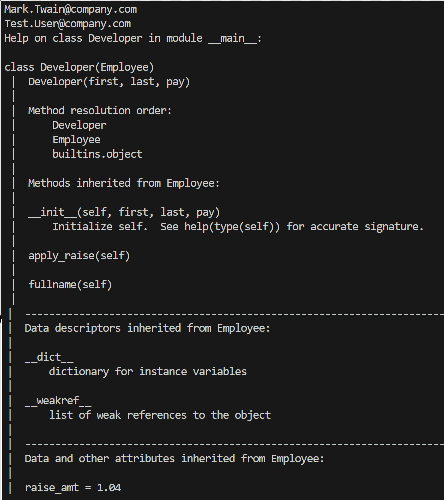
help functionにより、inheritの様子が表示されました。
5.Subclassにcodeを追加する
(1) まずは、次のcodeをrunします。
print(dev_1.pay)
dev_1.apply_raise()
print(dev_1.pay)
その出力結果は下の画像です。

raise_amt=1.04なので、50000*1.04=52000が表示されました。
(2) 次に、class Developerの中を次のように書き換えます。
class Developer(Employee): # inherit from Employee class
raise_amt = 1.2
つまり、parent class Employeeからもらった raise_amt = 1.04 をsubclass Devoloperの中で書き換えました。そして、もう一度runしてみます。

今度は、raise_amt=1.2なので、50000*1.2=60000が表示されました。しかし、raise_amtの変更は、class Developerの中だけなので、parent class Employerには影響していません。
それを確認するために、次のcodeをさらに付け加えます。
emp_1 = Employee('Ken', 'Follett', 70000)
print(emp_1.pay)
emp_1.apply_raise()
print(emp_1.pay)
そして、runします。

見てわかるように、70000の次は、70000*1.04=72800となっており、Employeeにおけるraise_amt=1.04のままだということがわかります。
6.subclassにinit methodを追加する
class Developer以下のcodeを次のように書き換えます。
class Developer(Employee): # inherit from Employee class
raise_amt = 1.2
def __init__(self, first, last, pay, prog_lang):
super().__init__(first, last, pay) # refers to parent class
self.prog_lang = prog_lang
dev_1 = Developer('Mark', 'Twain', 50000, 'Python')
dev_2 = Developer('Test', 'User', 6000, 'Java')
print(dev_1.email)
print(dev_1.prog_lang)
すなわち、class Developerの中に、init methodを追加しました。これにより、Developerは、自分の中のinit methodを使うことになります。このinit methodの中で、super().を使って、parent classのinit methodをそのまま使用できるようにしてあります。prog_langというargumentを追加したので、それに対応したattribute設定として、self.prog_lang = prog_langが追加されています。
これをrunしました。
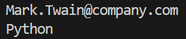
予定していた出力がなされています。
7.別のsubclassを作る
(1) もう1つsubclassを作ります。
class Manager(Employee): # inherit from Employee class
def __init__(self, first, last, pay, employees=None):
super().__init__(first, last, pay) # refers to parent class
if employees is None:
self.employees = []
else:
self.employees = employees
Managerというclassです。
Employeeからinheritするので、()内にEmployeeと書きます。
しかし、init methodeを新たに書き直して、employeesというargumentを追加します。defaultはNoneとします。また、first, last, payについては、Employeeのものを使うので、
super().__init__(first, last, pay)
という形で書いてあります。
さらに、employeeがNoneのときは、empty listとし、何か入力値があるときは、それを要素とするlistを作ります。
(2) ここで、employee is Noneとemployee == Noneの違いについて、ChatGPTに確認しておきます。
What is the difference between the following two codes?
(1) if employees is None:
self.employees = []
(2) if employees == None:
self.employees = []
The key difference between the two codes lies in how they check for None. Let's break it down:
Code (1):
-
This uses
isto check whetheremployeesisNone. -
ischecks identity, meaning it verifies ifemployeesis literally the same object asNone. -
This is the recommended way to check for
Nonein Python becauseNoneis a singleton (there is only one instance ofNonein memory).
Code (2):
-
This uses
==to check forNone, which means it checks for equality instead of identity. -
While this works in most cases, it is not recommended because a custom class could define an
__eq__method that makes an object compare equal toNone, even when it's not actuallyNone.
Which one should you use?
✅ Use is None (Code 1) because it is the standard and safest way to check for None in Python.
🚫 Avoid == None (Code 2) because it is less reliable and could be
affected by custom equality methods.
identity(is)とequality(==)の違いとのことですが、では、この2つの違いとは何でしょうか。これもChatGPTに聞いてみます。
What is the difference between identity and equality?
同じメモリーを指している(is)か、異なるメモリーだが中身が同じである(==)かの違いでした。
(3) Managerの中に、もう3つ関数を作ります。
def add_emp(self, emp):
if emp not in self.employees:
self.employees.append(emp)
def remove_emp(self, emp):
if emp in self.employees:
self.employees.remove(emp)
def print_emps(self):
for emp in self.employees:
print('-->', emp.fullname())
最初の2つのmethodsは、Managerのinstantceのemployeesというattributeに、empを付け加え、または取り除くmethodsです。最後のmethodは、employeesの中身をprintするmethodです。
(4) subclass Managerの動きを調べるために、instanceを作ってみます。
dev_1 = Developer('Mark', 'Twain', 50000, 'Python')
dev_2 = Developer('Test', 'User', 6000, 'Java')
mgr_1 = Manager('Sue', 'Smith', 90000, [dev_1])
print(mgr_1.email)
print(mgr_1.fullname())
このcodeを今まで作った3つのclassesのEmployee, Developer, Managerの下に置きます。そして、runしました。

emailとfullnameが表示されました。
(5) Managerのmethodsも試してみます。次のcodeを追加します。これにより、mgr_1が管理するすべてのemployeesが表示されるはずです。
mgr_1.print_emps()
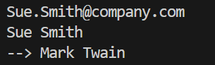
mgr_1が現在管理しているのは、[dev_1]なので、このMark Twainが出力されました。
(6) mgr_1が管理するemployeesを、もう1人追加してから、printしてみます。次のcodeに書き換えます。
mgr_1.add_emp(dev_2)
mgr_1.print_emps()
そして、runします。
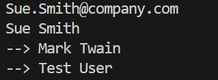
2人表示されました。
(7) さらに、1人removeしてみます。次のcodeに書き換えます。
mgr_1.add_emp(dev_2)
mgr_1.remove_emp(dev_1)
mgr_1.print_emps()
そして、runします。
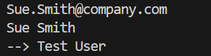
dev_1が削除されて、Sue Smithだけ表示されました。
8.ここまでのCode
ここまでのCodeの全体を掲示しておきます。
class Employee:
raise_amt = 1.04 # class variable
def __init__(self, first, last, pay):
self.first = first
self.last = last
self.email = first + '.' + last + '@company.com'
self.pay = pay
def fullname(self):
return '{} {}'.format(self.first, self.last)
def apply_raise(self):
self.pay = int(self.pay * self.raise_amt)
class Developer(Employee): # inherit from Employee class
raise_amt = 1.2
def __init__(self, first, last, pay, prog_lang):
super().__init__(first, last, pay) # refers to parent class
self.prog_lang = prog_lang
class Manager(Employee): # inherit from Employee class
def __init__(self, first, last, pay, employees=None):
super().__init__(first, last, pay) # refers to parent class
if employees is None:
self.employees = []
else:
self.employees = employees
def add_emp(self, emp):
if emp not in self.employees:
self.employees.append(emp)
def remove_emp(self, emp):
if emp in self.employees:
self.employees.remove(emp)
def print_emps(self):
for emp in self.employees:
print('-->', emp.fullname())
dev_1 = Developer('Mark', 'Twain', 50000, 'Python')
dev_2 = Developer('Test', 'User', 6000, 'Java')
mgr_1 = Manager('Sue', 'Smith', 90000, [dev_1])
print(mgr_1.email)
print(mgr_1.fullname())
mgr_1.add_emp(dev_2)
mgr_1.remove_emp(dev_1)
mgr_1.print_emps()
9.Python's built-in functions: isinstance() and issubclass()
(1) Pythonには、2つのbuilt-in functionsであるisinstance()とissubclass()があります。
まずは、isinstance()の使い方です。ここまでのcodeに次のcodeを付け加えます。
print(isinstance(mgr_1, Manager))
print(isinstance(mgr_1, Developer))
print(isinstance(mgr_1, Employee))
1行目は、mgr_1はManagerのinstanceなので、Trueが返されます。
2行目は、mgr_1はDeveloperのinstanceではないので、Falseが返されます。
3行目は、mgr_1はEmployeeをinheritしているので、Employeeのinstanceともいうことができ、Trueが返されます。runして、確認します。
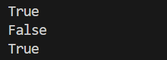
(2) 次に、issubclass()です。これは、あるclassが別のclassのsubclassであるかどうかを調べるfunctionです。
print(issubclass(Developer, Employee))
print(issubclass(Manager, Employee))
print(issubclass(Manager, Developer))
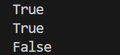
1行目は、DeveloperはEmployeeのsubclassなので、Trueが返されます。
2行目は、ManagerはEmployeeのsubclassなので、Trueが返されます。
3行目は、ManagerはDeveloperのsubclassではないので、Falseが返されます。runして、確認します。
次は、Part 5です。